// Workflows · Free PDF
Your AI agent office: three ways to keep client data private
The in-depth guide to the reel. How to run the ArtCraft office apps on your own computer or server, which AI model to plug in, what it costs and what you really need for compliance, in the US (HIPAA) and in Europe (GDPR). With a big chapter on Claude in your own AWS account via Amazon Bedrock: costs, use cases and setup for the small office, the trade business, the mid-sized company and the large corporation.
Important: I'm not a lawyer or a compliance officer. Everything in this guide is tips and hands-on experience, not legal advice. I researched the facts carefully, but laws, prices and contracts change. Before you process customer data, patient data, client data or your employees' data with AI, get advice from your privacy or compliance officer or a lawyer who knows your industry. I'm also not a cost expert: all costs in this guide are simple back-of-the-envelope calculations with stated assumptions.
At a glance
| ① Local | ② Your own cloud | ③ Claude in your own AWS account | |
|---|---|---|---|
| Model | Open models (Qwen, GLM, gpt-oss) | The same open models, on a rented GPU server you run yourself | Claude via Amazon Bedrock, US or EU profile |
| Where data runs | In your office | On your rented server, in the data centre and country you pick | In the AWS regions of the profile you pick: US regions or EU regions |
| Who can read along | Nobody outside your building | Your team; the host has physical access to the hardware | According to AWS, Anthropic has no access. Prompts aren't used for training |
| Does anyone store prompts | No, everything stays with you | Only if you switch on logs yourself | For Opus, Sonnet and Haiku, no mandatory storage according to AWS. Exception Claude Fable: up to 30 days |
| Agent performance | Good for simple tasks in one app | Good to medium (bigger models fit than at home) | Strongest on long chains |
| Cost | Hardware once | A GPU server, from a few hundred to a few thousand a month | Pay per use; in everyday office use roughly 5–15 USD per user per month, developers much more |
| Contract you need | None for the AI (except with your IT provider) | A contract with your server host (BAA in the US for patient data, DPA in the EU) | US: AWS BAA for patient data. EU: the AWS DPA applies automatically |
| Fits | Maximum privacy, professional secrecy | Teams with some tech skills who want full control | From the office to the corporation, when quality matters |
In 60 seconds: hands and brain
To make the rest easy to follow, here's the picture from the reel:
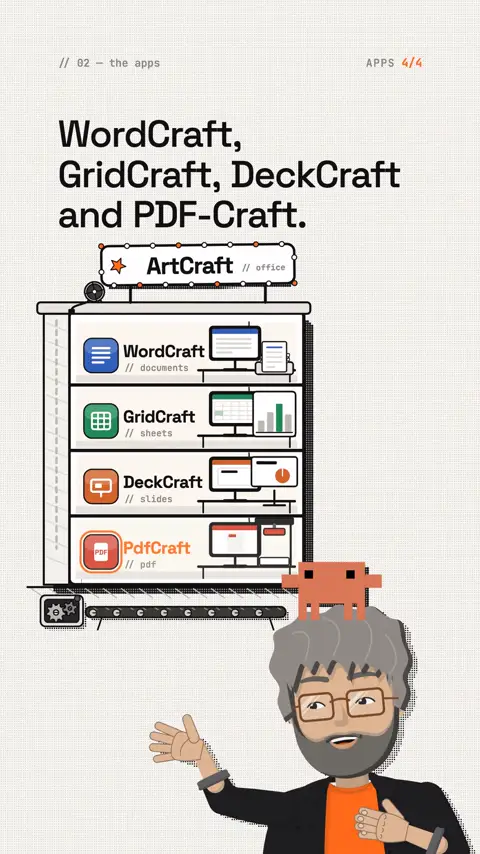
- The apps are the hands. WordCraft, GridCraft, DeckCraft and PdfCraft open files, write, calculate, export. They run on your computer or your server. Your files stay there.
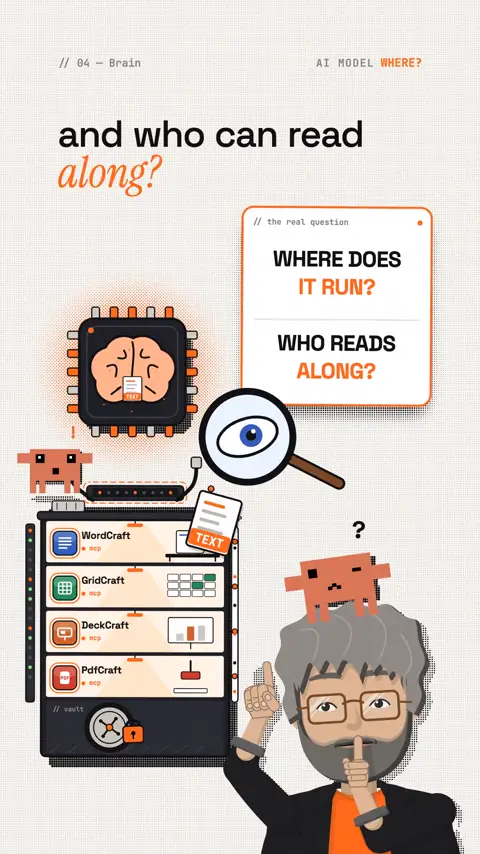
- The AI model is the brain. It decides what the hands should do. Without a brain, nothing happens.
- Every task goes to the brain as text. When you write "Turn the spreadsheet into a report", your agent sends that sentence, plus the parts of the file it needs right now, to the model. The answer comes back, and the hands carry it out.
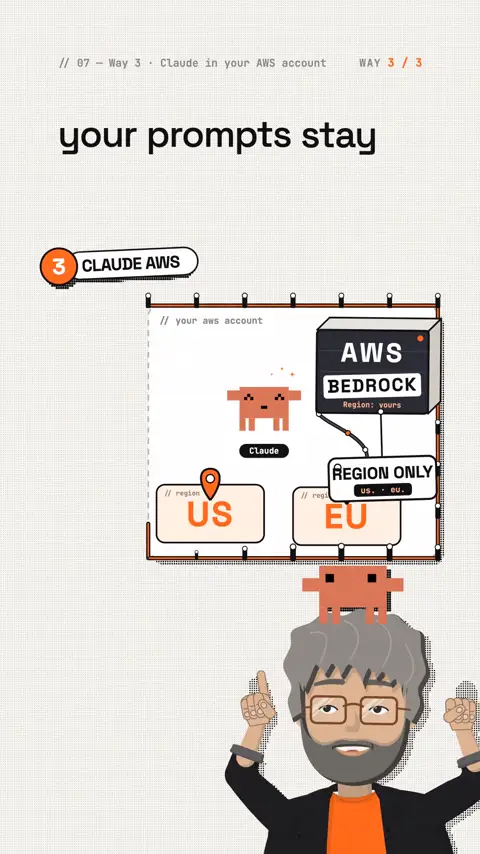
- So the real question is: where does this brain run, and who can read along? That's exactly what the three ways are for. ① The brain sits in your office. ② It sits on a GPU server you rent and run yourself. ③ It's Claude, but it runs inside your own AWS account, in the US or the EU, and Anthropic sees nothing.
Rule of thumb: the files stay with you. Whatever the model is meant to read leaves your building on ways ② and ③, as text. That's why you decide for every task what the agent may see.
The office: four apps an agent drives
The office apps come from ArtCraft, open source and free:
- WordCraft for documents
- GridCraft for spreadsheets (tools like
read_range,write_range,set_cell,evaluate_formula) - DeckCraft for slides
- PdfCraft for PDFs (find text, rotate pages, merge, fill forms, password protection)
Every app has an MCP server that runs without a window. MCP is a kind of plug socket that lets an AI agent operate programs. So the apps also work on a server with no screen.
I don't send out any software. Only download the apps from the official page:
All Crafting Apps · getartcraft.com/appsgetartcraft.comLock the agent into one folder
This is the most important privacy step: the agent only sees the folder you allow. Whatever isn't in the folder can't go to the model as text either.
PdfCraft, one folder only (according to the team it opens no network port):
Command
claude mcp add pdfcraft -- pdfcraft-cli mcp --root ~/AgentOffice/pdfWordCraft, reading and writing in one folder only:
Command
claude mcp add wordcraft -- wordcraft-cli mcp --automation-read-root ~/AgentOffice --automation-write-root ~/AgentOfficeGridCraft without a window:
Command
claude mcp add gridcraft -- gridcraft-cli mcpCheck: type /mcp in Claude Code, the apps must show as connected. The exact flags of each app are in its README; they change quickly right now.
Way ① Local: nothing leaves the building
- Models: Qwen (Apache-2.0) or GLM (MIT). Small models (27–35 billion parameters) run on a Mac or PC with 32–64 GB of memory, large ones need 96 GB and more.
- App: LM Studio or Jan (point and click, both support MCP). For pros: Claude Code via Ollama (
ollama launch claude), not officially supported by Anthropic. - Honestly: for simple tasks in one app, a local model is enough. On long chains across several apps, small local models score clearly behind the big models in agent tests. Test it with your own task before you commit.
- Cost (estimate): your own computer roughly 2,000–6,000 (dollars or euros) once, an AI box like NVIDIA DGX Spark more (see below). No monthly fees for the AI.
- Especially suited to: professionals bound by secrecy (doctors, lawyers, accountants) who don't want anything to leave the building, and tasks with lots of personal data.
The AI box for your desk: mini PCs from NVIDIA, AMD and Apple
Big brands now build small computers with one job: running large AI models right in your office. The best known is NVIDIA DGX Spark. A box 15 by 15 centimetres (about 6 by 6 inches), 1.2 kilos, with a chip inside that normally sits in data centres. For the agent office that means: the model runs on your desk, your data never leaves the building, and still it fits models far too big for a normal PC.
Why memory is what counts. An AI model has to fit completely into the memory of the graphics unit. A good gaming graphics card has 16 to 32 GB, enough for small models. These mini PCs have up to 128 GB of unified memory that the processor and the graphics unit share. That runs models with 100 to 200 billion parameters, the class that is clearly more reliable on agent tasks than the small ones.
| NVIDIA DGX Spark | Partner devices with the same chip | AMD Ryzen AI Max+ 395 mini PCs | Apple Mac Studio | |
|---|---|---|---|---|
| Chip | GB10 Grace Blackwell | GB10 Grace Blackwell | Ryzen AI Max+ 395 with Radeon 8060S | M chips (Max, Ultra) |
| Unified memory | 128 GB (64 GB via partners) | 64 or 128 GB | up to 128 GB, up to 96 GB of it for the AI | depends on the model, into the hundreds of GB |
| Model size per maker | up to 200B parameters, two linked units up to 400B | same as DGX Spark | roughly up to 120B parameters | depends on memory |
| Operating system | DGX OS (Linux) | DGX OS (Linux) | Windows or Linux | macOS |
| Examples | NVIDIA Founders Edition | ASUS Ascent GX10, Dell Pro Max GB10, HP ZGX Nano G1n, Lenovo ThinkStation PGX, MSI EdgeXpert, Acer Veriton GN100, Gigabyte AI TOP Atom | Framework Desktop, HP Z2 Mini G1a, GMKtec EVO-X2, Beelink GTR9 Pro | Mac Studio |
| Price (early November 2026) | 6,950 USD (128 GB, US list price), 64 GB units from 4,999 USD | in the EU roughly 5,000–8,100 euros before VAT, by maker and SSD | roughly 2,000–4,200 USD with 128 GB | several thousand, depending on memory |
What the DGX Spark can do. NVIDIA quotes up to 1 petaflop of AI compute (FP4, theoretical peak), 128 GB of memory at 273 GB/s, up to 4 TB of encrypted SSD and a fast network port that links two units into one. With a 240-watt power supply it draws about as much as a strong office PC. build.nvidia.com/spark has ready-made guides ("playbooks") for Open WebUI (a chat interface for the team), LM Studio, vLLM, llama.cpp and coding agents. NVIDIA Sync lets you reach the box from your laptop.
How the box fits the agent office. The box sits in the office, the model runs on it (for example an open Qwen or GLM model). Your agent and the office apps talk to it over the company network like a small AI server of your own. Everyone on the team uses the same model without a single byte going to the internet. For HIPAA and GDPR this is the simplest case: no AI provider processes the data, so there is no BAA or DPA to sign with one.
Honestly:
- Prices are rising. The DGX Spark launched at 3,999 USD in October 2025, went to 4,699 USD in February 2026 and to 6,950 USD in October 2026. Higher memory prices are given as the reason. Compare current offers before you buy, including the partners'.
- Big doesn't mean fast. 273 GB/s of memory bandwidth is far less than on large graphics cards. The box can load big models but answers more slowly than a data centre. For an agent writing a report in the background that doesn't matter. For ten people chatting at once it gets sluggish.
- Linux, not Windows. DGX Spark and the partner devices run DGX OS, a Linux. If you only know Windows, plan an afternoon for setup or have someone who knows Linux do it.
- Not every model is as good as Claude. Even a large open model still trails the best cloud models on long agent chains. The box is strong for routine work with sensitive data. The hardest tasks often stay with Claude (way ③).
Who it pays off for. Practices, law firms and accounting offices that don't want client or patient data to leave the building at all. Small teams automating lots of routine work without paying per request. Anyone who would otherwise rent a GPU server: after roughly four to six months of server rent you have spent the price of your own box.
Way ② Your own cloud: a GPU server only your team controls
Same open models as way ①, but not on a computer under your desk. You rent a strong server with a graphics card (GPU) in a data centre and run the model there yourself. No AI company sits in between. Only your team has the keys.
What that looks like in practice
- The server: a GPU server or GPU instance. You can rent one from a hosting company or from one of the big clouds (AWS, Microsoft Azure, Google Cloud). You pick the country and the data centre.
- The software that runs the model (inference server): for example vLLM or Ollama. According to its docs, vLLM provides an HTTP server with OpenAI-compatible endpoints (
vllm serve <model>). Ollama is simpler to start with. - The models: open models such as Qwen or GLM, the same ones as in way ①. With 96 GB of GPU memory, bigger models fit than on most office computers.
- Your office apps and Claude Code or LibreChat then talk to this server instead of an AI company.
Example prices
For a sense of scale, a European host (Hetzner, prices per month excluding VAT, as listed on 2 November 2026):
| Server | GPU memory | Per month | One-off setup |
|---|---|---|---|
| GEX45 | 24 GB | €214 | €209 |
| GEX63 | 96 GB | €999 | €999 |
| GEX131 | 96 GB | from €1,499 | €1,499 |
At the big US clouds you usually pay per hour for GPU instances, and prices differ a lot by GPU and region. Use the provider's price calculator. [check before you rely on it]
Who has access, and what you're responsible for
- Your team holds the logins and keys. The model provider (for example the makers of Qwen) has no connection to your server.
- The host runs the building and the hardware. That's why you still need a contract with them: in the US a business associate agreement (BAA) if patient data is involved, in the EU a data processing agreement (DPA).
- You are the operator. Patching the operating system, updates, firewall, backups, who may log in: that's your job, or the job of an IT provider you hire.
- Don't open the model to the internet. According to the Ollama FAQ, Ollama binds to
127.0.0.1:11434by default, so only the server itself can reach it. The FAQ describes no built-in login. If you change that (OLLAMA_HOST=0.0.0.0), put a VPN or a reverse proxy with a login in front of it. - Logs: an inference server can write prompts to log files. Check what is logged and how long it stays.
Plus and minus
- Plus: full control, no AI company sees your prompts, fixed monthly price, works with any open model.
- Minus: weaker than Claude on long chains across several apps. You need someone who can run a Linux server. A server that runs 24/7 costs money even when nobody uses it.
Way ③ Claude in your own AWS account: Amazon Bedrock in detail
This is the way I get asked about most after the reel. So here it is in full.
What Bedrock is, in plain words
Amazon Bedrock is a service from AWS (Amazon Web Services). Through it you use ready-made AI models from various makers, Claude among them, without running servers yourself. It runs inside your own AWS account. You only pay for what you use, billed in tokens. A token is a piece of a word, roughly three to four letters.
The key point: AWS runs the model, not Anthropic. According to AWS, every model runs in its own AWS account per region, and the model makers have no access to your prompts, answers or logs. According to Anthropic, its staff have no access to this infrastructure.
Which Claude models there are and which one to pick
| Model | What for | Rule of thumb |
|---|---|---|
| Claude Haiku 5.5 | Bulk work: sorting, pulling out data, short answers, checking invoices | Around 20 times cheaper than Sonnet |
| Claude Sonnet 5.5 | Day-to-day business: emails, quotes, texts, chatbots, programming | The standard for almost everything |
| Claude Opus 5.5 | Heavy tasks: long contracts, tricky analyses, complex agents | Twice as expensive as Sonnet, but cheaper than older Opus models |
All three have been available on Bedrock since September and October 2026 and handle up to 1 million tokens at once, so very long documents. Claude can read images (photos of handwritten notes, scanned invoices), but not audio. For voice notes you first need to convert them to text.
Where your request goes: US profile, EU profile, global
For the newest models (Opus 5.5, Sonnet 5.5, Haiku 5.5), according to the AWS model cards, there is no single-region option in the US or the EU on the classic access route. You choose between a geography profile and global:
- US profile (ID starts with
us.): the request stays in US regions. Called from N. Virginia, according to AWS, it goes to N. Virginia, Ohio or Oregon. - EU profile (ID starts with
eu.): the request stays in EU regions. Called from Frankfurt, according to AWS, it goes to Frankfurt, Stockholm, Milan, Spain, Ireland or Paris. - Global (ID starts with
global.): the request can go to any commercial AWS region worldwide, including Asia, South America and the Middle East.
For customer or patient data, pick the geography where your data may be processed (us. or eu.), never global. According to AWS, the target regions of a geography profile never change.
According to Anthropic, the regional and geography profiles cost 10 % more than global. For most companies that's money well spent.
Tip for whoever runs your tech: AWS advises not to rely on the prefix alone for data residency, but to check a profile's target regions with
GetInferenceProfilefrom every region you call from. The targets depend on where you call from (from Canada, for example, the US profile also includes the Canadian region).
The prices
All prices in US dollars per 1 million tokens, excluding sales tax or VAT. The "Geo" columns are the prices with the 10 % surcharge for the US or EU profile.
| Model | Input | Output | Geo input | Geo output | Geo cache read |
|---|---|---|---|---|---|
| Haiku 5.5 (request up to 100,000 tokens) | 0.10 | 0.50 | 0.11 | 0.55 | 0.011 |
| Haiku 5.5 (request over 100,000 tokens) | 0.50 | 2.50 | 0.55 | 2.75 | 0.055 |
| Sonnet 5.5 | 2.00 | 10.00 | 2.20 | 11.00 | 0.11 |
| Sonnet 5 | 2.00 | 10.00 | 2.20 | 11.00 | 0.22 |
| Opus 5.5 | 4.00 | 20.00 | 4.40 | 22.00 | 0.22 |
| Opus 5 / Opus 4.8 | 5.00 | 25.00 | 5.50 | 27.50 | 0.55 |
What the terms mean:
- Input is everything you send to the model: your question, the file excerpts, the instructions. Output is the answer. Output costs five times as much as input.
- Cache read: if you always send the same long text along, for example your price list, it gets cached. Every further read costs only 5 % of the normal price on Sonnet 5.5 and Opus 5.5. That saves a lot of money.
- Batch: tasks that don't need to be done right away cost 50 % less. Careful: according to AWS, batch on Bedrock is so far only available for older models (for example Opus 5, Sonnet 4.6, Haiku 4.5), not for the 5.5 generation.
- New tokenizer: according to Anthropic, models from Claude 4.7 onwards produce about 30 % more tokens for the same text. That's already factored into the examples below. Measure it with your own texts, especially in other languages than English.
The prices come from Anthropic's price list and, according to several sources, also apply on Bedrock. The price table on the AWS page loads dynamically, so I couldn't read it directly. Check the prices in the AWS Pricing Calculator before you set a budget. [check before you rely on it]
Extra costs people often forget
| Item | Price according to AWS | Do you need it? |
|---|---|---|
| Budget alert (AWS Budgets) | Free | Yes, always |
| Guardrails: filter for personal data (PII) | 0.10 USD per 1,000 text units (1 unit = up to 1,000 characters) | When customers write to a chatbot |
| Guardrails: content filter | 0.15 USD per 1,000 text units | For public chatbots |
| Guardrails: your own patterns (regex) and word lists | Free | For your own ID formats, such as client or case numbers |
| Knowledge Base (chatbot over your own documents) | 5 USD per GB of documents per month plus 1 USD per 1,000 queries | From mid-sized companies upwards |
| Alternative vector database (OpenSearch Serverless, Classic) | At least 2 compute units, around 350 USD a month (US East example price) | Only for large projects |
| Logs (CloudWatch Logs) | About 0.50 USD per GB (US East example price), 5 GB a month free | Only if you switch on logging |
| Running agents (AgentCore Runtime) | 0.0895 USD per vCPU hour, 0.00945 USD per GB hour | Only at corporation level |
Worked examples by company size
All examples are estimates with the assumptions laid open: US or EU profile (same price), 21 working days a month, prices from the table above. Your usage can differ a lot. Check again after the first month.
The small office and freelancers (1–3 people)
Typical tasks: answering emails, writing quotes, summarising minutes and long documents, translating texts, building monthly reports with the agent office.
Assumption: 3 people each make 40 requests a day. That's 2,520 requests a month, each with 3,000 tokens of input and 600 tokens of output.
| Model | Calculation | Per month |
|---|---|---|
| Sonnet 5.5 for everything | 7.56 million input × 2.20 + 1.51 million output × 11.00 | about 33 USD |
| Haiku 5.5 for everything | 7.56 × 0.11 + 1.51 × 0.55 | about 1.70 USD |
| Plus 20 heavy tasks with Opus 5.5 | 20,000 input, 3,000 output each | about 3 USD |
Result: about 35–40 USD a month, so around 12 USD per person. There are no fixed AWS fees.
My advice: Sonnet 5.5 as the standard, Opus 5.5 only for the really tricky cases. If you don't fancy the AWS console, use a ready-made interface (see below) or Claude Code with the /setup-bedrock wizard.
The trade business (5–15 people, example: 10)
Think electricians, plumbers, carpenters, contractors.
Typical tasks: writing quotes from site measurement notes, writing service descriptions, checking incoming invoices for mistakes, pre-sorting and answering customer enquiries, typing up photos of handwritten notes.
| Task | Assumption | Model | Per month |
|---|---|---|---|
| Quotes | 300 a month; price list and service catalogue (20,000 tokens) sit in the cache, plus 3,000 new tokens and 2,000 tokens of answer | Sonnet 5.5 | about 14 USD (without cache about 22 USD) |
| Site measurement notes into clean text | 400 a month, 1,500 input, 800 output (note already as text) | Haiku 5.5 | about 0.25 USD |
| Checking incoming invoices | 500 a month, 5,000 input, 500 output | Haiku 5.5 / Sonnet 5.5 | 0.41 USD or 8.25 USD |
| Answering customer enquiries | 600 emails, 2,000 input, 500 output | Sonnet 5.5 | about 6 USD |
| General office chat | 10 people, 15 requests a day each | Sonnet 5.5 | about 42 USD |
Result: about 60–75 USD a month for the whole business. Possibly plus converting voice notes to text and the licence for a ready-made interface.
My advice: this is where the cache pays off most. Set up your price list, service catalogue and text templates as a fixed preamble. Checking and sorting with Haiku, everything the customer reads with Sonnet. And: a person reads every quote before it goes out.
The mid-sized company (50–500 employees, example: 200)
Typical tasks: a knowledge chatbot over manuals, policies and product data, pre-sorting support tickets with a draft answer, pre-checking contracts (not as legal advice), Claude Code in the developer team.
| Building block | Assumption | Per month |
|---|---|---|
| Knowledge chatbot | 150 active users, 10 questions a day each (31,500 questions), 6,000 tokens of document excerpts each, 600 tokens of answer | about 664 USD with Sonnet 5.5, about 33 USD with Haiku 5.5 |
| Knowledge Base for it | 20 GB of documents, 31,500 queries | about 131 USD |
| Contract review | 100 contracts, 40,000 tokens of input and 4,000 of output each, Opus 5.5 | about 26 USD |
| Support tickets | 5,000 tickets, 3,000 input, 500 output | 3 USD with Haiku, 61 USD with Sonnet |
| Personal data filter and content filter for the chatbot | only question and answer checked | about 39 USD |
| Claude Code, 10 developers | Assumption: heavy use every working day | about 650 USD with Sonnet 5.5, about 1,290 USD with Opus 5.5 |
Result: roughly 900–2,300 USD a month, depending on the choice of model and how much the developer team codes. The Claude Code assumption is the least certain one; usage varies a lot.
My advice: start the chatbot on Haiku and only switch to Sonnet if the answers are poor. Set up separate cost centres per department (application inference profiles and tags). Fix the models in Claude Code, otherwise, according to the docs, it bills at the Opus price. At this size at the latest, write down your AI rules and check your compliance duties (see the compliance chapter).
The large corporation (1,000+ employees, example: 5,000, of whom 3,000 are active)
Typical tasks: an AI assistant for everyone, agents in business processes (purchasing, accounting, HR), bulk processing of documents, Claude Code for large developer teams, central control through roles and policies.
| Building block | Assumption | Per month |
|---|---|---|
| Company assistant, all Sonnet 5.5 | 3,000 users, 15 requests a day each (945,000 requests) | about 12,630 USD |
| The same assistant with model routing | 50 % Haiku, 45 % Sonnet, 5 % Opus | about 7,270 USD |
| Bulk processing | 1 million documents, 3,000 input and 300 output each, Haiku 5.5 | about 495 USD |
| AI agents | 20,000 runs with 30 steps each, Sonnet 5.5 | about 10,560 USD plus about 360 USD for running them (AgentCore) |
| Claude Code, 200 developers | as in the mid-sized company | about 13,000 USD with Sonnet, about 25,900 USD with Opus |
Result: roughly 35,000–65,000 USD a month in this scenario. At these volumes, individual contracts with AWS are common ("Private Offer"); the terms aren't public. Reserved capacity is only available through the AWS account team and, according to AWS, currently not as a separate tier for the 5.5 models.
My advice: model routing saves the most here: a cheap model decides which request needs an expensive model. With an organisation policy (SCP) you can, according to AWS, enforce across the whole company that no data is stored, and limit which regions may be used. Watch the quotas: according to AWS, output tokens count several times towards the rate limit (ten times for Opus 5.5), but you're only billed for actual usage.
Use cases at a glance
| Size | Typical tasks | Model |
|---|---|---|
| Solo and office | Email drafts, quote texts, summarising minutes, translations, monthly reports in the agent office | Sonnet 5.5, Haiku 5.5 for routine |
| Trade business | Quote from site measurements, service descriptions, checking invoices, pre-sorting customer enquiries, typing up photos of notes | Haiku 5.5 for checking, Sonnet 5.5 for texts |
| Mid-sized company | Knowledge chatbot, ticket pre-sorting, contract pre-check, Claude Code in the team | Haiku and Sonnet, Opus for contracts |
| Corporation | Assistant for everyone, agents in business processes, bulk documents, central control | Routing across all three |
Privacy on Bedrock: the facts
Who handles your data? AWS, not Anthropic. Anthropic says so itself: on Bedrock, the cloud provider is the data processor.
Does Anthropic see my data? According to AWS, no: the model makers have no access to prompts, answers and logs. According to AWS, prompts and answers are not passed on to the model makers.
Is my data used for training? According to AWS, no: your data "is not used to improve the base models", neither Amazon's own nor the makers' models.
Are my prompts stored? This is where the difference matters:
- Opus, Sonnet and Haiku: according to AWS, nothing changes for Claude models released before Claude Fable 5, so there's no mandatory storage. According to AWS, Opus 4.8 explicitly allows "no storage" (zero data retention). Opus 5.5, Sonnet 5.5 and Haiku 5.5 are on none of the AWS lists with mandatory storage. Whether they explicitly allow the "no storage" mode isn't stated in the model cards; check this for your account. [check before you rely on it]
- Claude Fable 5 and 5.1: according to AWS, all traffic is stored for up to 30 days for automated abuse detection, and flagged requests can be reviewed by AWS staff. According to AWS, the data doesn't go to Anthropic. For customer or patient data, I would avoid Fable.
- With a US or EU profile, stored data sits in the target region inside that geography.
- According to AWS, you can currently only set the storage mode ("none" for no storage) via the API, not with a click in the console. If in doubt, have a service provider do it.
Logs: recording all requests (invocation logging) is off by default according to AWS. If you switch it on, the texts are stored there in plain text, even if a personal data filter masked them for the model. Make that decision consciously.
Encryption: according to AWS, data is encrypted in transit and at rest, and your own keys (AWS KMS) are possible. With AWS PrivateLink the connection even runs without the public internet.
Patient data (HIPAA): according to AWS, Bedrock "is HIPAA eligible" and appears on AWS's list of HIPAA eligible services (list last updated 15 October 2026). That does not make you compliant by itself. According to AWS, covered entities and business associates must not use these services for protected health information (PHI) without first entering into the AWS business associate agreement (BAA). You review and accept the BAA for your account in AWS Artifact in the AWS console. Only process PHI in HIPAA eligible services. AWS also says there is no HIPAA certification for a cloud provider. Details in the compliance chapter.
Certificates: according to AWS, Bedrock is in scope for ISO, SOC and CSA STAR Level 2. In the AWS GovCloud (US-West) region it is FedRAMP High authorized. For Europe: AWS has a BSI C5 attestation (the German government's cloud standard), and Bedrock is within its scope.
For EU companies, data transfers to the USA: according to its own statement, AWS is certified under the EU-US Data Privacy Framework. The EU General Court dismissed the action against it on 3 September 2025 (case Latombe, T-553/23). According to articles by law firms, an appeal is pending at the Court of Justice of the EU (C-703/25 P); I don't know of a date for the judgment. In normal operation with the EU profile, your content doesn't leave the EU anyway.
Remaining risk for EU companies, the CLOUD Act: AWS is a US company. US authorities can also request data stored outside the USA. According to its own page, AWS has reported zero disclosures of enterprise content stored outside the USA since 2020 and commits to challenging overly broad requests. Legally, it can't be ruled out. If you want to avoid it completely, take way ① or way ② with a non-US host.
AWS European Sovereign Cloud: since 14 January 2026 there's a separate AWS cloud in Brandenburg, Germany, cut off from the other regions and run by EU residents. Bedrock is available there, but according to my research Claude isn't (yet). So far it runs open models such as Gemma 4. Relevant for the European public sector and critical industries.
Useful Bedrock features
- Guardrails (protective filters): filters for personal data detect names, addresses, emails, phone numbers, bank and card numbers, licence plates and more, plus US-, Canada- and UK-specific types. They can block them or replace them with placeholders such as
{NAME}. For your own formats (client numbers, case numbers, foreign ID numbers) you add your own patterns for free. Limits: according to AWS, agents' tool calls are not checked, and guardrails are only available on the classic access route (bedrock-runtime). - Knowledge Bases: a chatbot that looks things up in your own documents and answers with sources (RAG).
- Agents and AgentCore: a toolkit for running your own AI agents, with memory, tools and permissions.
- Prompt caching: cache recurring long texts, for 5 minutes or 1 hour.
- Permissions and cost centres: with IAM you decide who may use which model. With tags and inference profiles you see the costs per department.
Getting started, step by step
- Create an AWS account with your company details and a payment method. Switch on two-factor sign-in (MFA) for the root user straight away.
- Set a budget alert: in AWS Budgets create a monthly budget, for example 50 USD, with an email at 80 % and 100 %. Free.
- Don't work with the root user: create a separate user or role that is only allowed to use Bedrock.
- Pick your region: top right in the console. US example: "US East (N. Virginia) us-east-1". EU example: "Europe (Frankfurt) eu-central-1".
- Patient data? Accept the BAA first: in AWS Artifact, before any PHI goes in. No patient data, no BAA needed for this step.
- Decide on storage: if you definitely want no storage, have the "none" mode set and avoid Claude Fable.
- Fill in the Anthropic form: for the first Claude model, AWS asks once for your company name, website and purpose. Approval usually comes right away. According to AWS, other models are enabled automatically on the first call.
- Test in the playground: open a Claude model and send a test request, without customer data. Choose the profile of your geography (ID starts with
us.oreu.), notglobal.. - Decide on logging consciously: the default is off. Leave it off if you don't need it.
- File your contracts: the BAA (US, patient data) or the DPA (EU), and note in your records which AI service you use for what.
Note: according to AWS, new accounts sometimes get lower usage limits, and increases aren't granted automatically. For a big launch, apply in good time.
Claude Code and the agent office on Bedrock
According to the docs, Claude Code officially runs on Bedrock. The easiest way: start claude, choose "3rd-party platform" and then "Amazon Bedrock". The wizard asks for sign-in and region, checks the models and saves everything. You can reopen it any time later with /setup-bedrock.
Or by hand, for the US:
Command
export CLAUDE_CODE_USE_BEDROCK=1
export AWS_REGION=us-east-1
export ANTHROPIC_BEDROCK_REGION_PREFIX=us
For the EU, use AWS_REGION=eu-central-1 and ANTHROPIC_BEDROCK_REGION_PREFIX=eu.
- In EU regions, according to the docs, Claude Code uses the
eu.profile automatically. Setting the prefix yourself (us,eu,globaland others) makes it explicit. - Pin the models, for example with
ANTHROPIC_DEFAULT_SONNET_MODELandANTHROPIC_DEFAULT_OPUS_MODEL. If you don't, the main model is Opus 5.5, and the docs warn that you're then billed at the Opus price. - Claude Code's web search isn't available on Bedrock.
- The docs recommend a separate AWS account for Claude Code, so you can see the costs clearly.
Then connect the office apps via MCP as above, with the folder lock.
Ready-made interfaces instead of the AWS console
- LibreChat (open source, self-hosted): has a built-in Bedrock connector, region of your choice.
- Claude Code via
/setup-bedrock. - The once popular "Bedrock Access Gateway" for Open WebUI has been discontinued according to GitHub. Don't use it any more.
- Using a paid AI workspace that runs Claude on Bedrock for you? Ask them in writing which region and profile they use, and whether they sign a BAA or DPA with you.
Honest limits of Bedrock
- Not in one region alone: for the newest models, the US profile spreads across several US regions, the EU profile across six EU countries. Pure single-region options are limited (in Europe, for example, Sonnet 5 and Opus 4.8 in Stockholm and Ireland via the newer Mantle access, without guardrails and without logging).
- New models sometimes arrive later in some regions, or without batch.
- Fewer features than directly at Anthropic: according to Anthropic, among other things no Files API, no server-side code execution and web search, no Agent Skills.
- AWS billing is hard to read: Claude shows up under the model provider (AWS Marketplace), extra costs separately. Set up budgets and cost centres from the start.
- For EU companies, the CLOUD Act remains a residual risk (see above).
Bedrock compared with the other routes to Claude
| AWS Bedrock | Anthropic directly (API, claude.ai) | Google Cloud | Microsoft Foundry | |
|---|---|---|---|---|
| Who runs the model | AWS | Anthropic | Anthropic | |
| Data processor | AWS | Anthropic | Anthropic for Microsoft | |
| Processing in the US only | Yes, US profile, +10 % | Yes, US option, +10 % | [check before you rely on it] | Yes, US Data Zone |
| Processing in the EU only | Yes, EU profile, +10 % | No, only US or global | Yes, multi-region EU, +10 % | No, only global or US |
| Default storage | None (except Fable: up to 30 days) | None by default, exceptions for certain models and flagged content | According to Google's rules | Prompts stay in Azure, metadata goes to Anthropic |
Careful, easy to mix up: "Claude Platform on AWS" is not Bedrock. It's run by Anthropic, billed through AWS Marketplace and, according to Anthropic, offers US or global processing, no EU option. If you want Claude inside your own AWS account, use Bedrock.
What you really need for compliance
No tool makes you compliant on its own. These points make the difference. Once again: these are tips, not legal advice.
For everyone
- A contract with your provider. Whoever runs the model or the server for you: get the right contract in place (BAA for patient data in the US, DPA in the EU). Clarify in writing: is your data used for training? How long is it stored?
- Clear rules. Write a short internal AI policy: which tasks, which data, which tools. Train your team on it.
- Least access. Lock the agent into one folder. No passwords or keys in prompts. Only give each person and each agent the access they need.
- Logs, on purpose. Decide what is logged, who can read it and how long it stays. Logs can contain plain text.
- A human check. A person reads every quote, every customer email and every contract analysis before it takes effect.
- Keep names out where you can (more in part 2).
US: HIPAA (patient data)
If you are a covered entity (for example a practice, clinic or health plan) or a business associate working for one:
- Sign a BAA before any PHI goes in. Under the HIPAA Privacy Rule (45 CFR 164.502(e)), you may only let a business associate handle PHI for you if you get "satisfactory assurance" that it will safeguard it. In practice that's the business associate agreement. At AWS you accept it in AWS Artifact; according to AWS, it is required before you use its HIPAA eligible services for PHI.
- Only HIPAA eligible services. According to AWS, PHI may only be processed, stored and transmitted in the services listed as HIPAA eligible. Bedrock is on the list. Check every other service you add (logging, storage, vector databases) against the list too.
- Minimum necessary. HIPAA asks you to make "reasonable efforts" to limit PHI to the minimum needed for the purpose (45 CFR 164.502(b)). For an agent: send only the fields the task needs, lock it into one folder, strip names where you can.
- Ways ① and ②: on your own hardware there's no AI provider in between. If someone else hosts the server for you (way ②), that host is usually a business associate, so you need a BAA with them too. [check before you rely on it]
State privacy laws: several US states have their own privacy laws. Example: California's CCPA, amended by the CPRA, gives California residents rights to know, delete, correct and opt out. According to the California Attorney General, it applies to for-profit businesses that, among other criteria, have more than 25 million dollars in gross annual revenue. Check which state laws apply to you.
EU: GDPR (personal data)
- Data processing agreement (GDPR Art. 28). According to AWS, the AWS Data Processing Addendum is part of the AWS Service Terms and applies automatically to everyone covered by the GDPR, including the EU Standard Contractual Clauses. You don't have to sign anything extra. File a copy anyway. For way ②, sign a DPA with your server host.
- Use the EU profile (
eu.), never global, for personal data on Bedrock. - Transfer basis. AWS is certified under the EU-US Data Privacy Framework (still under appeal at the Court of Justice of the EU, see above). The CLOUD Act stays a residual risk with any US provider.
- Records and transparency. Add the AI service to your record of processing activities and update your privacy policy.
- Data protection impact assessment (DPIA, GDPR Art. 35): with customer or employee data on a larger scale, check whether you need one.
- AI literacy (EU AI Act, Art. 4): applies since 2 February 2025. If you use AI in your business, you must make sure your people can handle it. According to the EU Commission no certificate is needed; internal records are enough. National authorities can enforce this since 2 August 2026.
- Pseudonymised data stays personal data for you (GDPR Recital 26). Replacing names lowers the risk, but it doesn't replace the DPA.
Professionals bound by secrecy (lawyers, doctors, accountants)
Your professional rules may be stricter than privacy law. Lawyers have duties of confidentiality to their clients, doctors have medical secrecy, accountants and tax advisers have their own rules. Whether a cloud AI service is allowed for client matters, and under which contract, depends on your bar, board or chamber and your country. Ask them, or a lawyer who knows your profession. Until then: way ① (local), or keep client names out of the prompts (part 2).
Mid-sized companies and corporations: when the AI bill gets big
From a few hundred people upwards, a few dollars quickly turn into five-figure monthly bills. Then it pays to look closer. This chapter answers three questions: where do the big amounts really come from? Are licences per user cheaper? And how do large companies send tasks to Claude without handing over customer data?
All calculations here are deliberately simple: quantity × list price, no discounts, no sales tax or VAT. They show the order of magnitude. They don't replace a quote or a proper calculation. I'm not a cost expert.
Where the big amounts really come from
Look at the corporation example above again (3,000 active users, roughly 35,000–65,000 USD a month):
| Building block | Per month | Share |
|---|---|---|
| Chat assistant for all 3,000 | about 7,300–12,600 USD | small per head: around 2.40–4.20 USD per person |
| AI agents in business processes | about 10,900 USD | medium |
| Claude Code for 200 developers | about 13,000–25,900 USD | the biggest chunk |
| Bulk processing of documents | about 500 USD | small |
The simple calculation per chat request with Sonnet 5.5 in the US or EU profile: 3,000 tokens in × 2.20 USD per million, plus 600 tokens out × 11 USD per million. That's around 1.3 cents per request. Someone who asks 15 questions a day makes 315 requests in 21 working days, so about 4 USD a month.
What that means: the normal office chat rarely makes it expensive. Developers who work with Claude Code all day and agents that take many steps in a row do. That's exactly where you need to look.
Lever 1: the right model for every task
- Model routing: a cheap model (Haiku 5.5 or a local model) sorts the requests first and decides which ones really need the expensive model. In the corporation example above, that saves around 40 % on the assistant (7,270 instead of 12,630 USD).
- Cache: whatever you send along every time (policies, price lists, manuals) costs only 5–10 % of the normal price from the cache.
- Routine work local: simple tasks such as sorting, summarising or formatting can often be done by an open model on your own hardware (way ①). Then you pay no tokens for them, only power and the server.
- Developers with a budget: in Claude Code, set a spending limit per team and pin the default model. Opus only for the really hard cases.
Lever 2: seat licences instead of paying per token
Many large companies ask: isn't a fixed licence per person cheaper? And does it get cheaper if you switch off training on your own data? I checked both.
Switching off training doesn't make anything cheaper. I found no provider where the price drops when training is off. On the business plans of Anthropic, OpenAI, Google and Microsoft, training on company data is off by default anyway. The real difference between a personal subscription and a business plan is the contract: personal plans (Claude Pro, ChatGPT Plus) run under consumer terms, with no data processing agreement (DPA) and no business associate agreement (BAA). So they're off limits for customer data, patient data or your employees' data, even if you switch training off.
The main business offers (list prices per person and month, as of 2 November 2026). First Claude itself:
| Offer | Price | Training | BAA (US patient data) | EU processing (for EU teams) |
|---|---|---|---|---|
| Claude Team Standard | 20 USD annual, 25 monthly; 2–150 people | off by default | no | no |
| Claude Team Premium | 100 USD annual, 125 monthly; 5× usage | off by default | no | no |
| Claude Enterprise | 20 USD plus all usage at API prices; from 20 people | off by default | yes, "HIPAA-ready" with a BAA from Anthropic | no, "US-only" |
| Claude API | per token | not used | yes, signed in the Claude Console (eligible organisations) | no, US or global |
The other big offers:
| Offer | Price | Training | BAA (US patient data) | EU processing (for EU teams) | Claude included? |
|---|---|---|---|---|---|
| ChatGPT Business | 20 USD annual, 25 monthly; up to 200 people | off by default | only ChatGPT for Healthcare and API healthcare customers* | unclear* | no |
| Microsoft 365 Copilot | 30 USD on top of Microsoft 365 | off | not covered here | yes (EU Data Boundary) | yes; in the EU off by default and outside the boundary |
| Google Workspace with Gemini | €13.60 Standard, €21.10 Plus (European list); up to 300 people* | off | "Gemini can support HIPAA workloads" | only Enterprise Plus | no |
Items marked with an asterisk: [check before you rely on it]. The ChatGPT BAA and EU details come from search results (see the note below); Google's US prices differ from the European list. Google's BAA doesn't cover Gemini Notebook or Gemini in Chrome.
Also worth knowing: Microsoft Copilot Chat comes at no extra cost with eligible Microsoft 365 licences (training off, no Claude). Mistral Le Chat Team (France) costs 24.99 USD, training can be switched off, no Claude.
For EU teams: European AI workspaces such as Langdock (Berlin, Claude included), meinGPT and nele.ai host in the EU and bill in euros, from roughly €5 to €25 per person depending on volume, partly plus a model budget.
I couldn't load OpenAI's official pages technically. The ChatGPT facts come from search results of those pages. Check them directly with OpenAI before you decide.
Important for EU teams: Claude directly from Anthropic (Team, Enterprise and the API) offers no processing in the EU, only "US" or "global". Claude with processing in the EU is available through AWS Bedrock or Google Vertex, and through EU providers that build on them.
Simple comparison: 200 people
| Route | Calculation | Per month |
|---|---|---|
| Claude Team Standard | not possible, 150 people maximum | – |
| Claude Enterprise | 200 × 20 USD = 4,000 USD, plus usage | about 4,600–4,800 USD |
| ChatGPT Business | 200 × 20 USD | 4,000 USD |
| For EU teams: Langdock with volume pricing | 50 × €23.20 + 150 × €19.20 | about €4,000 |
| Chat via Bedrock | 200 × around 4 USD | about 800–900 USD |
Simple comparison: 3,000 people
| Route | Calculation | Per month |
|---|---|---|
| Claude Enterprise | 3,000 × 20 USD = 60,000 USD, plus usage | about 67,000–72,000 USD |
| Microsoft 365 Copilot | 3,000 × 30 USD | 90,000 USD |
| Chat via Bedrock, all Sonnet | 3,000 × around 4 USD | about 12,600 USD |
| Chat via Bedrock with routing | as above, mixed models | about 7,300 USD |
Rule of thumb: a 20 USD seat only pays off once a person makes more than about 1,500 requests a month. That's around 70 requests per working day. Most office users are well below that.
Why companies still buy seats:
- The price is predictable, the interface is ready, and sign-in through the company account (SSO) is included.
- With Bedrock you only get the technology. For 3,000 people you still need an interface (for example LibreChat or a ready-made workspace) and someone to run it.
- For heavy users and developers, a premium seat is often cheaper than tokens. According to the calculation above, a developer with Claude Code on Bedrock costs roughly 65–130 USD a month, a Team Premium seat 100 USD.
What most end up doing: combining. One chat for everyone (Copilot Chat, a workspace or your own interface on Bedrock), premium seats for heavy users and developers, and the API for everything that should run automatically. Agents and the agent office with the MCP apps need the API anyway.
Lever 3: the gatekeeper in front of Claude
Many larger companies don't send customer data raw to a cloud AI at all. They put a small gatekeeper in front of it, in their own building or their own network. It replaces names and numbers with placeholders, sends only the placeholder text to Claude and puts the real values back into the answer. Experts call this pseudonymisation.
This is how it works:
- An employee writes: "Summarise the complaint from Jane Doe, customer number 48213."
- The gatekeeper in your own data centre spots the name and the number.
- It replaces them: "Summarise the complaint from
<PERSON_1>, customer number<CUSTOMER_1>." - The mapping (
<PERSON_1>= Jane Doe) stays in-house. - Only the placeholder text goes to Claude.
- The answer comes back with placeholders, and the gatekeeper puts the real values back in.
The tools for it:
| Tool | Where it runs | Languages | Puts the real values back? | Cost |
|---|---|---|---|---|
| Presidio (open source) | with you | English out of the box; other languages after setup (language model, switch on the matching recognisers) | yes, with your own mapping table | free |
| LiteLLM with Presidio (open source gateway) | with you | set with presidio_language (for example "en") | yes (output_parse_pii) | free |
| Small local models as detectors (for example the GLiNER family) | with you, CPU or small GPU | several, test first | through your own code | free, plus the server |
| Bedrock Guardrails | in the AWS cloud | English and other languages | no: only replaces with the type, for example {NAME} | 0.10 USD per 1,000 text units |
The difference matters: Presidio and LiteLLM work before the data leaves your building. Bedrock Guardrails filters in the cloud. The plain text is then already at AWS, and logs you switch on store it unfiltered.
A gateway like LiteLLM can also take over the routing from lever 1: routine work to the cheap model, hard cases to Claude. Gatekeeper and switch in one.
What to watch out for with the gatekeeper
Pseudonymisation is good protection, but not a free pass. First the legal side:
- US: pseudonymised is not HIPAA de-identified. Under 45 CFR 164.514, health data only counts as de-identified in two ways. Safe Harbor: all 18 listed identifiers are removed (names, small geographic units, all date parts except the year, phone numbers, email, record and account numbers, IP addresses and more), and you have no "actual knowledge" that the rest could identify the person. Or Expert Determination: an expert finds and documents that the risk is "very small". A typical gatekeeper replaces names and IDs, but leaves dates, places, job titles and free-text details. That is not Safe Harbor. So for PHI you still need the BAA with the provider.
- EU: for you the data stays personal data. Whoever holds the mapping list can reverse it. That's why the GDPR still applies to you (GDPR Art. 4(5) and Recital 26). You still need the DPA with the provider.
- The 2025 EU court ruling (CJEU, C-413/23 P): for a recipient who realistically can't identify the people, pseudonymised data can be anonymous. Not for you. And if the recipient passes it on to someone who can identify them, it's personal data again. The European data protection authorities are still working on final guidelines. So don't rely on "it's anonymous at the provider anyway".
Now the practical side, where most leaks happen in real life.
- No filter finds everything. Presidio says so itself. In an English test with court judgments, its default setup fully caught only just under half of the direct identifiers. The only reliable number is your own test with your own texts.
- Context gives the person away. Even without a name, "the branch manager in Boise who has been on sick leave since March" can be unique. Job, place and date together are often enough. And AI models can infer where someone lives, their age or their income from harmless-looking text. In one study they got it right in up to 85 % of cases.
- The story across many requests. Each request on its own is harmless. But if the same placeholder shows up in many requests over weeks, a picture builds up. So assign new placeholders per case, not the same ones forever.
- History, memory and logs at the provider. Chat interfaces store histories, some have a "memory". At Anthropic, content flagged as a policy violation can be stored for up to two years. According to Anthropic, the Claude Team and Enterprise interfaces are not eligible for "zero data retention". For sensitive cases, use the API through your gatekeeper rather than the chat interface.
- The mapping list is your crown jewel. Whoever steals it has all the names. Store it separately, encrypt it, limit access to a few people, delete it when the case is closed.
- Attachments, images and PDFs. A text filter misses names in scanned documents or images unless they are turned into text and checked first.
- Wrong reversal. If the model mixes up placeholders or invents new ones, the wrong name ends up in the letter. That's why a person reads every result that goes out.
- Hidden instructions (prompt injection). A prepared text can trick a model into giving data away. The gatekeeper should also check what comes back, and agents should only see the data they need.
Good practice for the gatekeeper
- Leave out first, then mask: whatever the model doesn't need isn't sent at all.
- An allow list: which kinds of data may leave at all?
- Add your own name lists from the CRM so customer names are reliably found.
- A test set of 100–300 sample texts from your everyday work, without real data. Measure what the filter finds and what it misses.
- Regular spot checks in operation.
- Logs at the gatekeeper, but without plain text.
- At the provider: no training, short storage, logs off or masked, the US or EU profile, never global.
- EU personal data: check whether you need a data protection impact assessment (DPIA, GDPR Art. 35).
- US patient data: include the gatekeeper and the AI service in your HIPAA risk analysis, and send only the minimum necessary.
- Involve your privacy or compliance officer from the start.
- A person checks everything that goes out.
What the gatekeeper roughly costs
| Item | Rough cost | Note |
|---|---|---|
| Software (Presidio, LiteLLM) | 0 | open source |
| Server without a GPU for Presidio | about €20–80 a month | my estimate for 4–8 CPU cores at an EU example host (Hetzner); cloud servers there start at €6.49 |
| Server with a GPU for a small detection model | for example €214 a month plus €209 setup (Hetzner GEX45, Helsinki, an EU example host) | only needed if an AI model should find the names |
| Building a prototype | roughly 2–5 person-days | my estimate |
| Building it for real operation | roughly 10–30 person-days | my estimate: test set, secure table, logs, documentation, input for the DPIA or HIPAA risk analysis |
| Ongoing upkeep | roughly 1–2 days a month | spot checks, lists, updates |
The server prices are from a European host. Costs at US clouds vary a lot by instance and region. [check before you rely on it]
Compared with five-figure monthly bills, that's little. But the gatekeeper doesn't save tokens directly. It lowers the risk, and it opens doors: with well pseudonymised data you can give Claude tasks you would never hand over raw.
Why there is no off-the-shelf solution
A one-minute reel can't answer this, and this guide can't fully either. Which mix suits your company depends on questions only you can answer:
- Which processes should use AI: chat for everyone, agents in departments, development, bulk processing?
- What data is in them: your own numbers, customer data, patient data, employee data, client secrets?
- How many people use AI, and how intensively?
- Do you already have Microsoft 365, Google Workspace or an AWS contract you can build on?
- What should the AI deliver in the end, and what is that worth to you?
There are solutions in any case: licences, Bedrock, a gatekeeper, local models, usually a mix. Which of them suits you only becomes clear once someone knows your processes.
Which way suits you?
| You are … | My suggestion |
|---|---|
| Freelancer, little customer data, want the best quality | ③ Claude in your AWS account with the US or EU profile, Sonnet 5.5 as the standard |
| US medical practice or health business | ③ only after signing the AWS BAA, with HIPAA eligible services only; or ① local for the most sensitive work |
| Lawyer, doctor, accountant | ① Local for everything involving clients, ③ only for texts without client data (until your professional body says otherwise) |
| Trade business | ③ with the cache for price list and text templates, Haiku for checks |
| Team with an IT person who wants full control | ② your own GPU server with an open model |
| Mid-sized company | ③ with Knowledge Base, guardrails and a clear AI policy; with lots of customer data, a gatekeeper in front |
| EU business that wants no US provider at all | ① local or ② with a European host |
| Corporation | ③ with model routing, central control, an individual contract; a gatekeeper with pseudonymisation in front; seats only for heavy users; ① or ② for especially sensitive areas |
Many end up with a mix: routine work local or on their own server, the hard tasks with Claude.
Even more control: keep client names out of the AI (in detail in part 2)
The topic is tricky, but not unsolvable. You already met the gatekeeper for mid-sized companies and corporations in the chapter above. Besides the three ways there are solutions that need more tech, but make sure names and customer data never reach the model in the first place. I show all of it in the next reel (part 2).
- The loop: a tool replaces names locally with placeholders (Jane Doe becomes
<PERSON_1>), only the placeholder text goes to Claude, and the real names are put back into the answer locally. The mapping list stays with you. - Presidio (open source, MIT, by Microsoft): finds names, emails, phone numbers, card and ID numbers with language models and patterns. It has recognisers for US numbers such as social security numbers; for other languages you add a language model and switch on the matching recognisers. Presidio itself says there is no guarantee it finds everything.
- A gateway in front of the model: the Presidio guardrail in LiteLLM masks before every call and puts the original values back into the answer (
pre_call+output_parse_pii). Every app in your office talks to the gateway, not directly to the model. On Bedrock you also have the built-in guardrails (see above). - Claude Code hooks: a hook runs locally on your computer before anything goes to the model. A
UserPromptSubmithook can stop a prompt with customer data (not rewrite it), and the prompt then never reaches the model. APostToolUsehook can mask files Claude reads before it sees them. - Important: masking lowers the risk, but it doesn't replace your contract with the provider. Under GDPR, pseudonymised data stays personal data; under HIPAA, only properly de-identified data is no longer PHI.
Prompts to copy
Your first report, without customer data:
Prompt to copy
Take the spreadsheet revenue.xlsx in the AgentOffice folder. Use GridCraft to make a chart per month, build three slides with the key numbers in DeckCraft and export everything with PdfCraft as report.pdf. Only work inside this folder.A quote from your template:
Prompt to copy
Open the template quote.docx with WordCraft. Fill in service, quantity and price from the spreadsheet prices.xlsx, check the total with GridCraft and save the quote as a PDF. No customer names, placeholders only.Have Claude Code set up on Bedrock:
Prompt to copy
Set up Claude Code for Amazon Bedrock: region us-east-1 with the US profile only (or eu-central-1 with the EU profile only), never global. Default model Sonnet 5.5, Opus 5.5 only when I ask for it. Create an AWS budget of 50 USD with an email alert at 80 percent and finally show me which models are available. Don't print any credentials in the chat.Plan your own GPU server (way ②):
Prompt to copy
I want to run an open model (Qwen or GLM) on a rented GPU server for my team of [number] people. Suggest a GPU size, compare vLLM and Ollama for my case, and write a setup plan: firewall, VPN or login in front of the model, no public port, updates, backups, and what gets logged. Don't run anything yet, just the plan.Estimate your costs:
Prompt to copy
I use Claude via Amazon Bedrock with the [US or EU] profile. Estimate my monthly costs: [number] people, [number] requests a day each, typical tasks: [tasks]. Use the current prices for Haiku 5.5, Sonnet 5.5 and Opus 5.5 including the 10 percent geo surcharge, show the calculation and suggest a cost-effective split between the models.Your first hour
- Download the office apps from getartcraft.com/apps.
- Create a folder
AgentOfficewith only your own numbers. - Connect the apps via MCP, with the folder lock.
- Pick one of the three ways. For Bedrock: account, budget alert, your region, the
us.oreu.profile. - Let it build your first report and check the result.
- After a week, look at the costs and adjust your choice of model.
- Only then think about tasks with customer data, with the right contract (BAA or DPA), written rules and training.
My tip
Start with a task without client data: a monthly report, your own numbers. Then you'll see whether a local model is enough or whether you need Claude. On Bedrock with a budget alert and the US or EU profile, a test like that usually costs only a few dollars. Then pick the way that fits you. Many end up with a mix: routine work local or on their own server, the hard tasks with Claude in their own AWS account.
Once again: not legal advice
I'm sharing tips from my own practice here and researched the facts to the best of my knowledge. I'm not a lawyer and not a cost expert. All costs are simple back-of-the-envelope calculations with stated assumptions (quantity × price), so you see the order of magnitude. Your real costs depend on your processes, your contract and your usage. This guide doesn't replace a review by your privacy or compliance officer, your professional body or a lawyer. For decisions about customer, patient, client or employee data, please get professional advice.
Sources
AWS: HIPAA eligible services reference · aws.amazon.comaws.amazon.com AWS: HIPAA compliance and the BAA · aws.amazon.comaws.amazon.com HIPAA Privacy Rule, 45 CFR 164.502 · law.cornell.edulaw.cornell.edu California Consumer Privacy Act · oag.ca.govoag.ca.gov AWS Bedrock: security and compliance · aws.amazon.comaws.amazon.com AWS Bedrock: data protection · docs.aws.amazon.comdocs.aws.amazon.com AWS Bedrock: data retention · docs.aws.amazon.comdocs.aws.amazon.com AWS Bedrock: abuse detection · docs.aws.amazon.comdocs.aws.amazon.com AWS Bedrock: profiles and regions · docs.aws.amazon.comdocs.aws.amazon.com AWS Bedrock: Claude Sonnet 5.5 model card · docs.aws.amazon.comdocs.aws.amazon.com AWS Bedrock: pricing · aws.amazon.comaws.amazon.com AWS Bedrock: guardrails for personal data · docs.aws.amazon.comdocs.aws.amazon.com AWS: GDPR Center · aws.amazon.comaws.amazon.com AWS: EU-US Data Privacy Framework · aws.amazon.comaws.amazon.com AWS: BSI C5 · aws.amazon.comaws.amazon.com AWS: CLOUD Act · aws.amazon.comaws.amazon.com Anthropic: Claude in Amazon Bedrock · platform.claude.complatform.claude.com Anthropic: pricing · platform.claude.complatform.claude.com Claude Code on Amazon Bedrock · code.claude.comcode.claude.com vLLM: online serving · docs.vllm.aidocs.vllm.ai Ollama: FAQ · docs.ollama.comdocs.ollama.com Hetzner: GPU servers · hetzner.comhetzner.com EU Commission: AI literacy FAQ · digital-strategy.ec.europa.eudigital-strategy.ec.europa.eu Anthropic: Team and Enterprise pricing · claude.comclaude.com Anthropic: Enterprise plan · support.claude.comsupport.claude.com Anthropic: API and data retention · platform.claude.complatform.claude.com Anthropic: data retention for organisations · privacy.claude.comprivacy.claude.com Microsoft 365 Copilot: pricing · microsoft.commicrosoft.com Microsoft: Anthropic as a subprocessor · learn.microsoft.comlearn.microsoft.com Google Workspace: pricing · workspace.google.comworkspace.google.com Google Workspace: Gemini privacy hub · knowledge.workspace.google.comknowledge.workspace.google.com LiteLLM: PII masking · docs.litellm.aidocs.litellm.ai Presidio · presidio.dataprivacystack.orgpresidio.dataprivacystack.org HIPAA de-identification, 45 CFR 164.514 · law.cornell.edulaw.cornell.edu Hetzner: GPU server GEX45 · hetzner.comhetzner.com NVIDIA DGX Spark: specifications · nvidia.comnvidia.com NVIDIA DGX Spark: Playbooks · build.nvidia.combuild.nvidia.com DGX Spark: price history and EU prices · guaardvark.comguaardvark.com Ryzen AI Max+ 395 mini PCs compared · computingforgeeks.comcomputingforgeeks.comAll prices, locations and commands checked on 2 November 2026 on the providers' pages and in the documentation. Worked examples are estimates. Prices change, check them in the AWS Pricing Calculator or with your host before you book.
The reel on this topic
This reel was made with Mentor Reels
Mentor Reels is a skill for Claude Code. From one prompt it makes a finished explainer reel with voice, animation, post texts and a PDF just like this one.
Read the transcript
Word, Excel, PowerPoint, PDF: your AI agent runs your entire office. On your own server, no licence fees, and your client data stays private. The apps come from ArtCraft: WordCraft, GridCraft, DeckCraft and PDF-Craft. Open source, free, and every one can be driven via MCP, even without a screen. That means: they run on a server you control, in your office or in your own cloud. Your files stay with you. But the apps are only the hands. The thinking is done by the AI model, the brain. Every task goes to that brain as text. So the real question is: where does it run, and who can read along? There are three ways. One: fully local. Open models like Qwen or GLM run on a strong computer in your office. Nothing leaves the building. For simple tasks that's already enough. On long chains across several apps, Claude is still clearly ahead. Two: your own cloud. You rent a GPU server and run the open model there yourself. Only your team has the keys. Three: Claude, inside your own AWS account. Through Amazon Bedrock, in the US or the EU, your prompts stay in that region, they aren't used for training, and Anthropic doesn't see them. Important: no tool makes you compliant on its own. Patient data in the US? You need a business associate agreement under HIPAA. In Europe, a data processing agreement under GDPR. And clear rules about what your agent may see. The apps help with that: you lock the agent into a single folder. My tip: start with a task without client data. A report, your own numbers. Then pick the way that fits you. Follow me and comment Office, and I'll send you the comparison of all three ways, with costs and setup. And in the next reel: how to keep client names out of the AI completely. Tricky, but not unsolvable.
Frequently asked questions
What is an AI agent office?
An AI agent that runs your office apps itself: it writes documents, crunches spreadsheets, builds slides and fills in PDFs. In the reel these are the four ArtCraft apps WordCraft, GridCraft, DeckCraft and PdfCraft. They are open source, run on your computer or server and are driven via MCP, even without a screen. The apps are the hands, the AI model is the brain.
Which three ways are there, and which one suits me?
One, local: an open model like Qwen or GLM runs on your own hardware, nothing leaves the building. Two, your own cloud: you rent a GPU server and run the open model yourself, only your team has the keys. Three, Claude inside your own AWS account via Amazon Bedrock, in US or EU regions: the strongest model for long tasks. Professionals bound by secrecy usually go with way one, the hardest tasks with way three. Many end up with a mix.
Does a tool make me HIPAA or GDPR compliant?
No. No tool makes you compliant on its own. Patient data in the US needs a BAA under HIPAA with every provider that touches it, Europe needs a DPA under GDPR. Plus clear rules on what the agent may see, and an agent locked into one folder. The guide shows what applies to everyone and what comes on top for teams, larger companies and professionals bound by secrecy. This is not legal advice.
What is NVIDIA DGX Spark, and do I need one?
A mini PC from NVIDIA, 15 by 15 centimetres, with the GB10 chip and 128 GB of unified memory. According to NVIDIA it runs models up to 200 billion parameters, two linked units up to 400 billion. Partners like ASUS, Dell, HP, Lenovo, MSI, Acer and Gigabyte build their own versions, and AMD mini PCs with the Ryzen AI Max+ 395 are a cheaper alternative. You need such a box if large models should run locally. For small models a Mac or PC with 32 to 64 GB is enough.
What does an AI box like DGX Spark cost?
As of early November 2026 the DGX Spark with 128 GB lists at 6,950 USD in the US, 64 GB units start at 4,999 USD. In the EU the partner devices cost roughly 5,000 to 8,100 euros before VAT, depending on maker and SSD. Prices have risen several times since launch in October 2025 (3,999 USD), so compare before you buy.
What does Claude via Amazon Bedrock cost in an office?
You pay per use. For everyday office work the guide estimates roughly 5 to 15 USD per user per month, developers using Claude Code need much more. There are worked examples for the small office, the trade business, the mid-sized company and the large corporation with stated assumptions, plus three levers large companies use to cut the bill.
Does AWS store my prompts?
For the Claude models Opus, Sonnet and Haiku there is no mandatory storage of your prompts according to AWS, and they are not used for training. According to AWS, Anthropic has no access. The exception is Claude Fable with up to 30 days of storage. With the US or EU profile, requests stay in the regions of that profile. For patient data in the US you sign the AWS BAA; in the EU the AWS DPA applies automatically.
Where should I start?
With a task without client data: a monthly report, your own numbers. Then you see whether a local model is enough or whether you need Claude. On Bedrock with a budget alert, such a test usually costs just a few dollars. The guide has a plan for your first hour and prompts to copy.
Keywords
Goes well with
-
// Skills, repos & add-ons
ArtCraft: 14 open-source apps instead of a subscription, built with Claude
One team is rebuilding Photoshop, Excel, AutoCAD and more as free open-source apps, with Claude on every fifth commit. All 14 apps, MCP commands and the honest limits.
-
// Skills, repos & add-ons
Craft Anything: Claude rebuilds what you show it, and checks itself
ArtCraft's 14th app: point it at a website, app or game, Claude Code builds your own version and compares it with the original at three widths. Commands, prompts and limits.
-
// AI workflows for business
Your AI council in Claude: seven advisor roles for real decisions
roast-room seats AI roles from Bezos to Buffett around your decision, Claude moderates three rounds, and you get a verdict with next steps.
-
// AI workflows for business
Claude becomes your SEO machine: real search data instead of guessed numbers
Why Claude guesses at search volume, how it pulls real Google numbers through DataForSEO, and why full keyword research costs only cents.
Your agent office: three ways to keep client data private
An AI agent writes reports, crunches numbers and builds slides. Three ways to keep your data private while it does: local (including NVIDIA DGX Spark), your own GPU server, or Claude in your own AWS account. With costs for every company size.