// Repos · Free PDF
Craft Anything: Claude rebuilds what you show it, and checks itself
Where to get Craft Anything, how the four steps work, how to connect it to Claude Code, and what you can do with it as a business owner.
At a glance
| Question | Short answer |
|---|---|
| What | The 14th Crafting App by ArtCraft: studies how a website, app or game works and has a coding agent build your own version |
| Who builds | Claude Code on your computer, with your own sign-in |
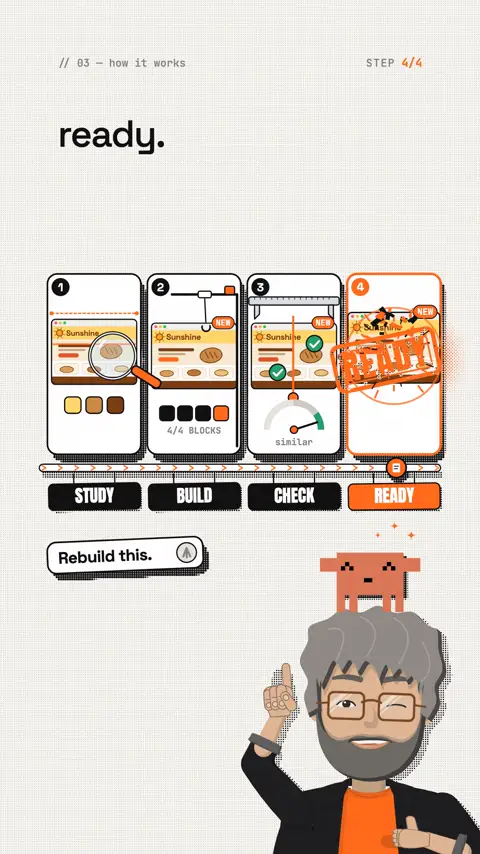
| Flow | Study → Build → Check → Ready |
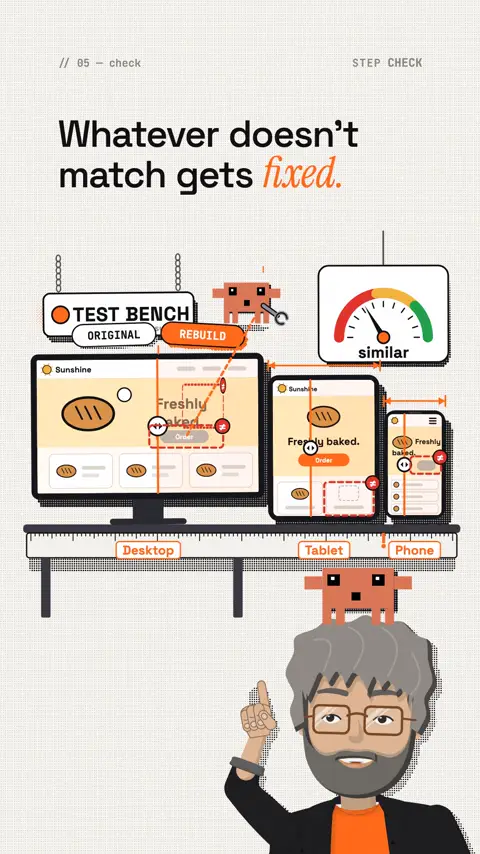
| Check | Websites are compared with the original at three screen widths and refined |
| For agents | 284 tools, each a command-line command and an MCP tool |
| Licence | Apache-2.0, free |
| Maturity | Early alpha, version 0.2.0 from 1 November 2026 |
How it works
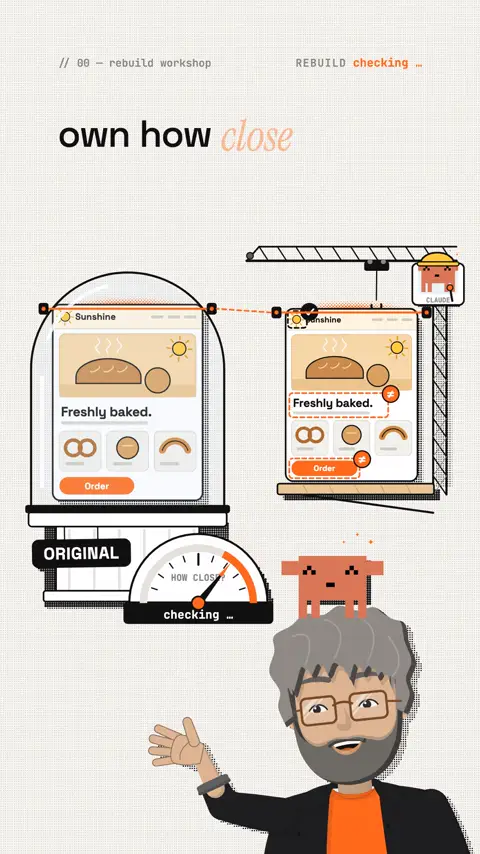
- Study: Craft Anything looks at the target: its pages at every width, layout, colours, fonts, spacing, how it behaves.
- Build: a coding agent builds a new project in the language or framework you name. Games also in Unity, Unreal or Godot.
- Check: the result is compared with the original. Whatever doesn't match yet goes on a list.
- Ready: open the result, or say what should change, and it gets refined.
In simple mode you just pick a website, app or game, describe what you want and press Start. The project page shows the four steps, what the agent is doing, its questions, and how alike the result already is.
Clean room or Deep
- Clean room (default): nothing inside the original is read, no code, no files, no page source. Craft Anything only works with what a visitor sees: screenshots, visible text, measured layout, colours, fonts.
- Deep (only on request): every tool, including reading program code, explicitly for private use.
Only use Craft Anything on software you own or are allowed to examine. According to the team, it never bypasses DRM, logins or anti-cheat.
Where to get it
I don't send out any software. Only download Craft Anything from the official pages.
All Crafting Apps · getartcraft.com/appsgetartcraft.com the official download page, Craft Anything is number 14. Source and releases · github.com/storytold/craft-anythinggithub.com installers for macOS, Windows and Linux, version 0.2.0.Connect it to Claude Code
Craft Anything runs your own, unmodified claude program with your own sign-in. It never sees your account. Install and sign in to Claude Code first.
Check everything is ready:
Template
craft-anything-cli doctorConnect Craft Anything to your coding-agent apps:
Template
craft-anything-cli setupRebuild a website straight from the terminal (questions are asked in the terminal):
Template
craft-anything-cli rebuild https://your-site.com "Recreate this website"Give your agent all 284 tools via MCP:
Command
claude mcp add craft-anything -- craft-anything-cli mcpCheck: type /mcp in Claude Code, Craft Anything must show as connected. New projects go into Documents/Craft Anything.
What you do with it as a business owner
| Situation | What Craft Anything gives you |
|---|---|
| A client wants "something like X" | A clickable prototype to talk about, instead of just sketches |
| You pay a subscription for a small tool | Your own version of your own workflow that belongs to you |
| Your website is old | A relaunch draft, built from your existing site |
| You want to understand how a tool is built | An analysis with evidence, without building anything ("Just look inside") |
Important: the result is a starting point, not a finished product. Check it before you show it to clients.
Prompts to copy
Your own website as a relaunch draft:
Prompt to copy
Study my website [address] in clean room mode and build a modern version with [framework]. Keep the content and structure, make the design calmer and mobile first. Show me what still doesn't match at the end.A prototype for a client (only with their permission or from your own sketches):
Prompt to copy
Build a clickable website prototype from these screenshots [files]. Don't use any third-party logos, photos or text, only placeholders.Your own small tool instead of a subscription:
Prompt to copy
I use a tool for [task]. Build me a simple version of my own with these features: [list]. Local, no account, the data stays on my computer.Limits and risks
- Early alpha: building with API keys and coding agents other than Claude Code has not been run live yet, according to the team.
- Rights: a rebuild from what a visitor sees is still not a free pass. Third-party logos, photos, text and distinctive designs can be protected. Only rebuild what you own or have permission for. Not legal advice.
- Deep mode: only for your private use and only on software you're allowed to examine.
- Cost: building runs on your Claude account and uses your plan's limits.
- Speed: new versions arrive almost daily. Check the README of the current version.
Your first hour
- Install Claude Code and sign in.
- Download Craft Anything from getartcraft.com/apps or the GitHub releases.
- Run
craft-anything-cli doctor. - Study and rebuild your own website in simple mode.
- Look at the result at three widths and ask for one change.
- Optional: add the MCP server in Claude Code and check it with
/mcp.
My tip
Start with your own website. You own all the rights, you know the original exactly, and you see right away how good the rebuild is. And a draft like that is often the fastest way into a relaunch.
All links, commands and numbers checked on 1 November 2026 in the README and on getartcraft.com.
In the next reel: your own agent office, on your own computer or your own server.
The reel on this topic
This reel was made with Mentor Reels
Mentor Reels is a skill for Claude Code. From one prompt it makes a finished explainer reel with voice, animation, post texts and a PDF just like this one.
Read the transcript
Claude now rebuilds any website. You point at it, it builds, then checks on its own how close it got. This is Craft Anything, the fourteenth app from ArtCraft. Here's how: point it at a website, an app or a game and say what you want. Then it runs in four steps: study, build, check, ready. The building is done by Claude Code, on your computer, with your own account. And the checking is honest: a website gets compared with the original at three screen widths. Whatever doesn't match gets fixed. For business owners, that means: the prototype for your client, your own tool instead of yet another subscription, the draft for your relaunch. As a starting point, built by your agent. And your agent can even run the whole thing itself: two hundred eighty-four tools, all via MCP. Important: by default it works clean room. It only sees what a visitor sees, no foreign code. Only use it on software you own or are allowed to examine. To be honest: still early alpha. Follow me and comment Craft, and I'll tell you where to get it, plus the commands for Claude Code. And in the next reel: your own agent office, on your own computer or your own server.
Frequently asked questions
What is Craft Anything?
Craft Anything is ArtCraft's 14th app, out since 1 November 2026 as version 0.2.0. You point it at a website, an app or a game and describe what you want. Then it runs in four steps: study, build, check, ready. The building is done by Claude Code on your computer, with your own sign-in. It is open source (Apache-2.0) and free.
How does Craft Anything check the rebuild?
A website is compared with the original at three screen widths (desktop, tablet, phone). Whatever doesn't match yet goes on a list and gets refined. The project page shows how similar the result already is.
Can I rebuild any website with it?
No. Only use it on software you own or are allowed to examine. The default is clean-room mode, which only sees what a visitor sees, no foreign code. Third-party logos, photos, text and distinctive designs can still be protected. According to the team, Craft Anything does not bypass DRM, logins or anti-cheat. This is not legal advice.
How do I connect Craft Anything to Claude Code?
Install Claude Code and sign in. Then run craft-anything-cli doctor to check everything is ready. For your agent, run claude mcp add craft-anything -- craft-anything-cli mcp in Claude Code and check with /mcp that it shows as connected. All 284 tools are then available to it.
What does building cost?
The app itself is free. Building runs on your own Claude account and uses your plan's limits there. Other coding agents and API keys have not been tested live yet, according to the team.
What is it good for as a business owner?
A clickable prototype when a client wants "something like X", your own small tool instead of another subscription, and a relaunch draft built from your existing website. The result is a starting point, not a finished product: still early alpha.
Keywords
Goes well with
-
// Skills, repos & add-ons
ArtCraft: 14 open-source apps instead of a subscription, built with Claude
One team is rebuilding Photoshop, Excel, AutoCAD and more as free open-source apps, with Claude on every fifth commit. All 14 apps, MCP commands and the honest limits.
-
// Skills, repos & add-ons
BAMA and REA: rebuild Mac apps with Claude
BAMA rebuilds native Mac apps with 21 skills, REA explains how an app works. Links, install steps, costs and where the legal line is.
-
// Skills, repos & add-ons
6 free GitHub repos that get more out of Claude
Hyperframes, Grill Me, Laya, Shaders, Diagram Design and REA: what they do, how to install them, and a quick safety check.
-
// Skills, repos & add-ons
Design school for Claude: how to teach it some taste
Why Claude keeps building the same AI page and how four design skills fix it: input, build, motion, review.
Craft Anything: Claude rebuilds what you show it
ArtCraft's 14th app: point it at a website, app or game, Claude Code builds your own version and compares it with the original at three widths. Commands, prompts and limits.